Qeasy Cloud
Get Started

ERP系统接口对接指南

Source: Qeasy Cloud861 views

接口文档

接口文档链接(需要权限,若无法访问,请联系班牛管理员)

对接流程

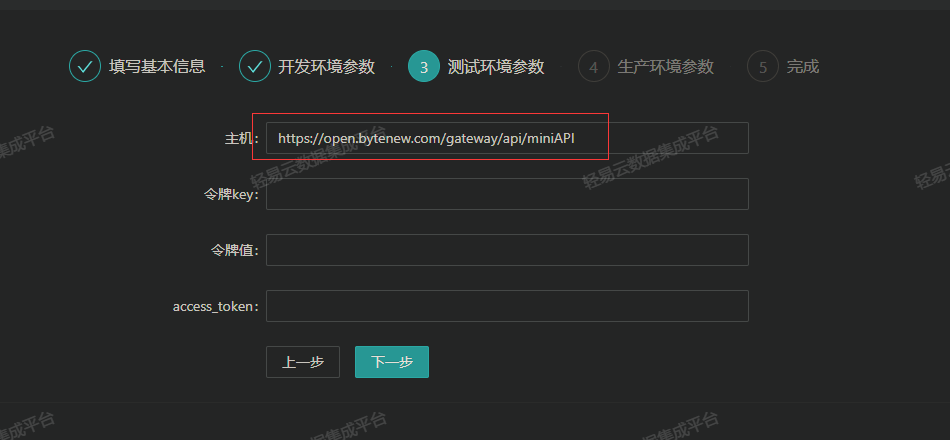
  1. 适配器编辑主机请使用:API地址,根据文档填写不同的请求地址。 upl-image-previewurl=//pic.qeasy.cloud/2023-05-10/1683689282-78889-image.png

新建配置方案并选择适配器

查询适配器:BanniuQueryAdapter 写入适配器:BanniuExecuteAdapter upl-image-previewurl=//pic.qeasy.cloud/2023-05-10/1683689291-981597-image.png

配置请求参数

设置API方法: upl-image-previewurl=//pic.qeasy.cloud/2023-05-10/1683689300-495378-image.png

POST请求参数写入: upl-image-previewurl=//pic.qeasy.cloud/2023-05-10/1683689309-94127-image.png

注意:如果POST参数中有其他参数需要放到URL上,请将其放到其他请求参数中。 upl-image-previewurl=//pic.qeasy.cloud/2023-05-10/1683689317-215552-image.png upl-image-previewurl=//pic.qeasy.cloud/2023--5--10-/16--83689326--801545--image-.png

特别注意事项

区分工作流程和普通工作图标。工作流程调用工作流程接口,工作图表使用工作图表接口。 upl-image-previewurl=//pic.qeasy.cloud/-20--23---0----5---31-/16--85516178--820598--image-.png 请注意文档中的接口说明。 upl-im-age-pr-eview-url=-///pic.qeasy.cloud/-20—23———0——5—31——16—85—51—6309—281707——ima-ge-.pn-g

获取工作表组件(如创建流程)

upl-im-age-pr-eview-url=-///pic.qeasy.cloud/-20–23–0–5–31–16–85526906–374627–ima-ge-.pn-g 接口文档参考4.4.2部分。

创建流程接口配置指南

根据上面获取的组件ID进行操作: upl-im-age-pr-eview-url=-///pic.qeasy.cloud/-20––23––0––5––31––16––85526967––153555––ima-ge-.pn-g 使用4.4.15发起流程,其中contents字段需与表单组件字段对应。

{
  "app_id": 9271,
  "project_id": 214996,
  "contents": {
    "2": "110485258",
    "5": "0",
    "7": "2021 -09 -100:00:00",
    "214997": "<p>地址组件测试</p>",
    "215005": "214998",
    "215004": "215002,215003",
    "215033": "215012,215026,215029" // 此处为地址组件,215033是地址组件id, 215012一级,表示省;215026是二级,表示市;215029是三级,表示区 / 县 
  }
}

Copyright Notice

The article "ERP系统接口对接指南" is original content owned by 广东轻亿云软件科技有限公司. Reposting, quoting, copying or mirroring is strictly prohibited without written authorization. Please contact us for authorization and credit the author and source (including the original link) prominently.